

3K Light Socket Security Camera,360 Degree Lightbulb Camera Outdoor Indoor Color Night Vision,Auto Tracking-Smart Alarm,Camera Light Bulb 2-Way Talk,Wireless WiFi Light Socket Camera
Product details
| Management number | 213571472 | Release Date | 2026/04/12 | List Price | $36.00 | Model Number | 213571472 | ||
|---|---|---|---|---|---|---|---|---|---|
| Category | |||||||||
Tuya Camera Installation 1. Download The App Before Installation. Search For Tuya Smart In App Store Or Google Play 2. Open The App And Click On The "+" Sign In The Top Right Corner To Add A Device (The Distance Between The Camera And The Router Should Not Exceed 35 Feet Range To Ensure A Stable Signal). 3. Find In The Options - "Camera & Lock" - Make Sure To Select Smart Camera (Dual Band Wi-Fi) For 5g Networks And Smart Camera (Wi-Fi) For 2.4g Network Users. 4. Select "I Hear A Beep" Or The Indicator Light Flashes Quickly. 5. Enter The Correct Wifi Username And Password (Please Do Not Have Special Characters For The Account Password). 6. Please Point The Qr Code On Your Phone At The Camera And Scan It Back And Forth At A Distance Of 10 -30cm. Once The Qr Code Is Successfully Recognised, You Will Hear A Beep And Select Next. 7. Wait For The Network To Be Assigned And Enter The Settings When The Installation Is Complete Resetting The Camera After Following The Above Steps And Still Prompting That You Cannot Connect, Please Reset The Camera And Re. 1. Keep The Camera Powered On. 2. Press And Hold The “Reset” Button For Approximately 5 Seconds Until You Hear The Successful Reset Voice Prompt. 3. Wait For The Camera To Complete One Revolution. 4. Camera Reset Successful.
- 🎦Optapower Light Bulb Security Camera【1080P HD And Color Night Vision】 Lightbulb Camera Has 1080P HD Resolution To Provide A Clearer Picture. You Can See More Details Of Your Porch Or Garage. Bulb Camera Security Wireless Built-In Spotlight, You Can See A Clear Color Image Even At Night.
- 🎦LightBulb Camera【Easy To Install】 Light Bulb security camera Is Certified By Etl, Just Screw Into A Normal E26/E27 Light Bulb Socket (110v~240v). Then Use Your Mobile Phone To Download The TUYA App And Connect To The Wifi Via The App, Setup Easily. (Only 2.4ghz Wifi Is Supported)
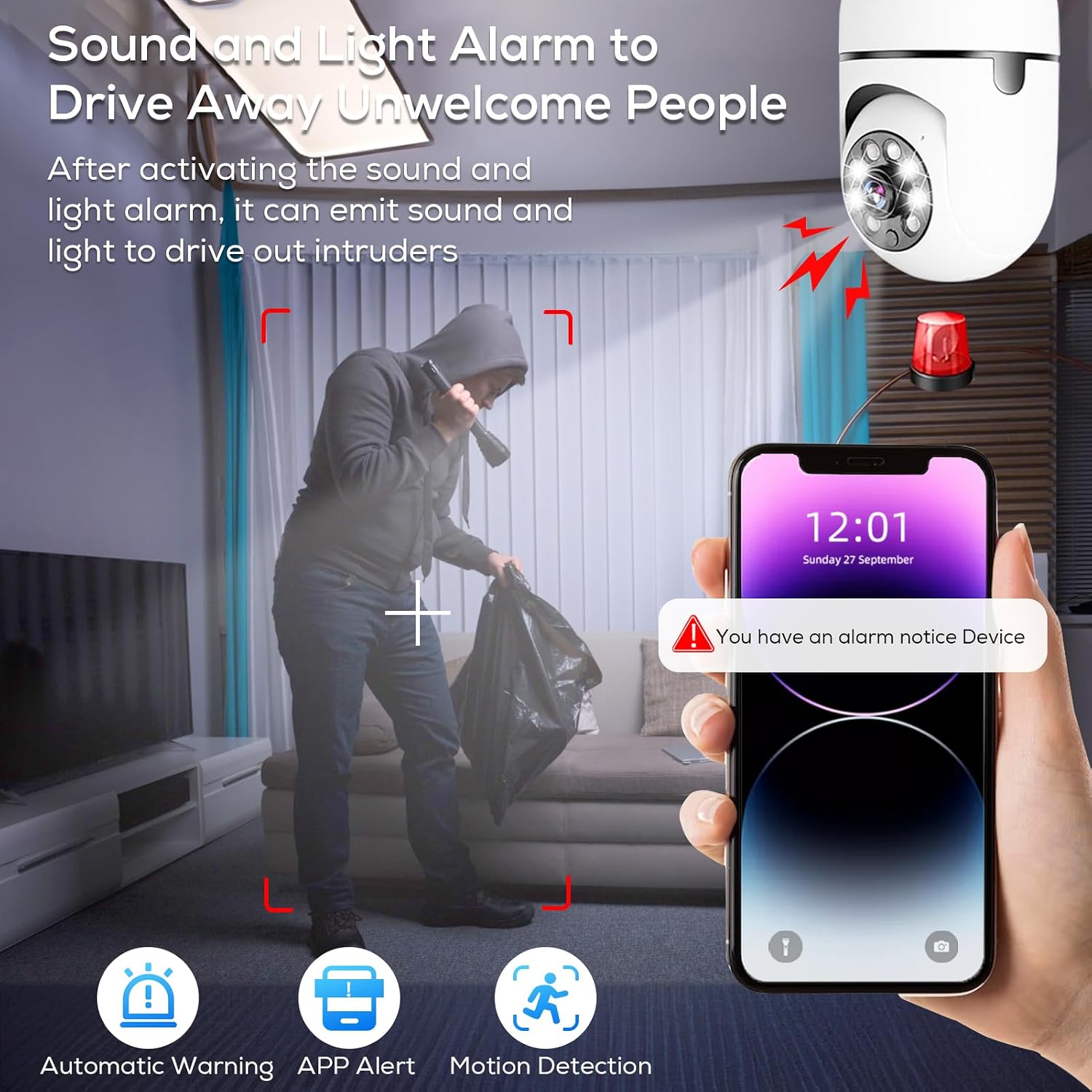
- 🎦Light Bulb Security Camera【Auto Tracking & Real-Time Alerts】 When The Wireless Security Camera Detects Motion, It Will Automatically Track The Motion And Push You Real-Time Alerts To Let You Know What'S Going On In Your Home. And You Can Turn On The Alarm In The TUYA APP To Drive Away Unexpected Guests. AIDMTONG
- 🎦Security Camera Light Bulb Outdoor【Two-Way Audio And High Quality Service】 This light bulb camera, you can talk to the deliveryman or visitors to the security camera. Light Bulb Camera Outdoor Wifi Built-In Microphone And Speaker,Camera Light Bulb If You Have Any Question,Please Contact Us.Light Bulb Security Camera Warm Reminder: The Light Bulb Lighting Function Of The Camera(Can Not Be Used For A Long Time,The Camera Bulb Heat Will Affect The Service Life)
- 🎦Light Bulb Security Camera Outdoor. 【Supports Live Video Recording & Storage】Download The Free Tuya App To Easily Control The Light Bulb Security Camera Outdoor Wireless Wifi, Light Socket Security Camera 360° All-Round Monitor Your Home.Security Camera Light Bulb Outdoor Supports Live Video, Which Can Protect Your House/Porch/Garage All Day Long. Wifi Camera Supports Sd Card Storage (Up To 128g, Not Included) Or Cloud Storage.If You Purchase Platform Cloud Services, You Will Be Charged.
| Brand | Generic |
|---|---|
| Room Type | Hallway, Living Room, Study Room |
| Alert Type | Motion Only |
| Unit Count | 1.0 Count |
| Manufacturer | Generic |
| Model Number | Light Bulb Security Camera |
| Night Vision | Night Color |
| Power Source | Corded Electric |
| Field Of View | 360 Degrees |
| Viewing Angle | 355 Degrees |
| Item Dimensions | 1 x 1 x 0.97 inches |
| Antenna Location | Indoor Security |
| Installation Type | Screw In |
| Wireless Technology | Wi-Fi |
| Indoor Outdoor Usage | Indoor |
| Are Batteries Required | No |
| Connectivity Technology | Wireless |
| Other Special Features of the Product | Night Vision |



Bestseller ranking
Hand Wraps


Customers who viewed this product also viewed
Light Sockets


Correction of product information
If you notice any omissions or errors in the product information on this page, please use the correction request form below.
Correction Request Form